
Nokta Triple Score Common Settings and How to Change Them
Learn how to select the right search mode, adjust sensitivity, choose a frequency, run Noise Cancellation, Ground Balance the detector, set Recovery Speed, customize tones and save your preferred Triple Score settings.
The Nokta Triple Score combines straightforward controls with settings that can be adjusted for parks, fields, beaches, relic sites and difficult ground. It can be used as a simple turn-on-and-go detector, but learning a few of its main controls can help you improve stability, target separation and audio response.
The SCORE user manual covers the SCORE, Double Score and Triple Score together. This guide has been written specifically for the Triple Score. Settings and limits listed below apply to the Triple Score rather than the lower SCORE models.

Understanding the Triple Score Controls
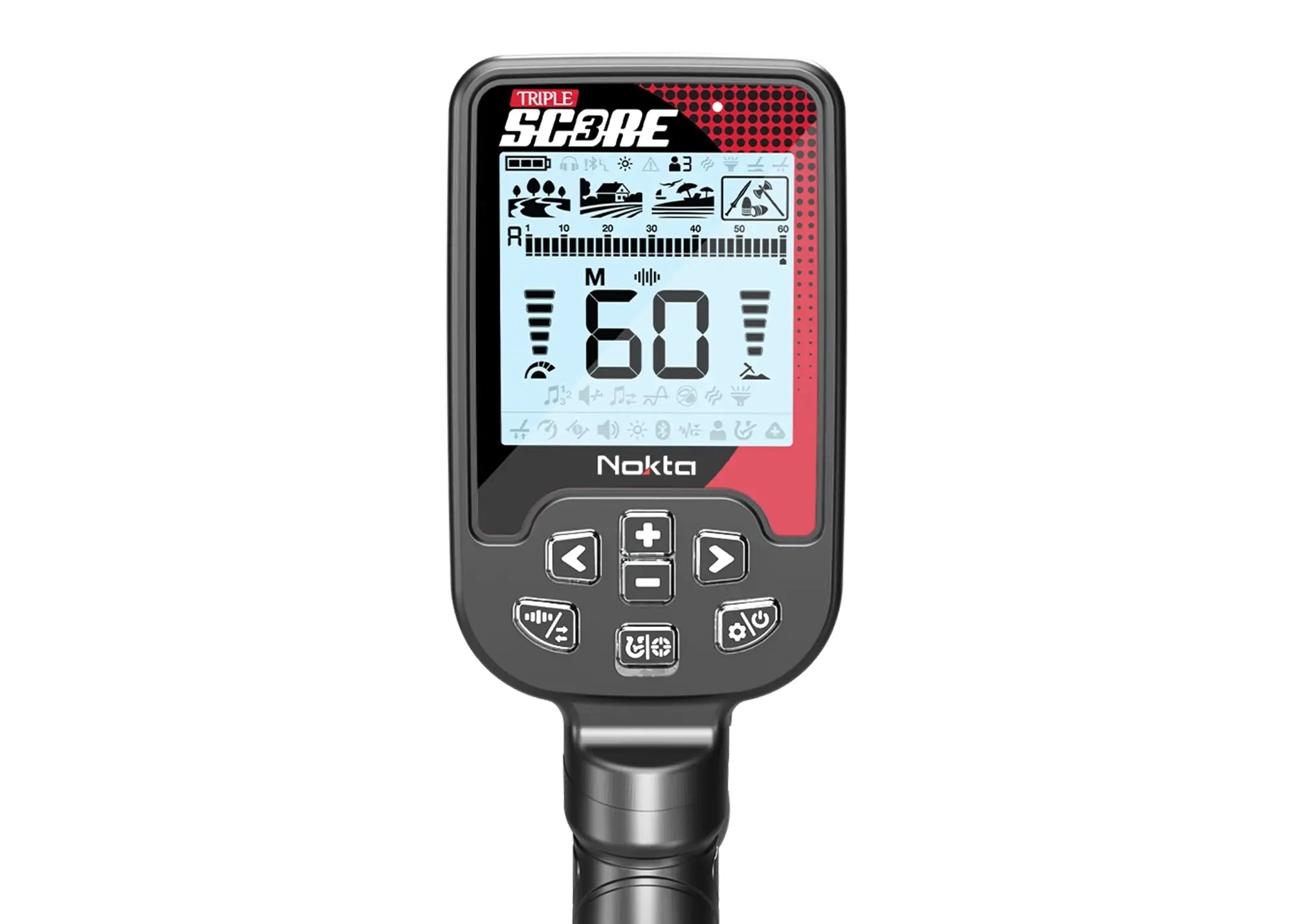
Most commonly used adjustments can be made directly from the front control panel. Learning these buttons will make it much easier to change settings while detecting.
Power and Settings
Hold the button to turn the detector on or off. Press it once while operating to enter or leave the settings menu.
Pinpoint and Discrimination
Hold the button from the main screen to use Pinpoint. Press it briefly to move through the available discrimination patterns.
Frequency and Noise Cancellation
Press briefly to change operating frequency. Press and hold to run automatic Noise Cancellation.
Plus and Minus
Use these buttons from the main screen to adjust sensitivity. Inside the settings menu, they change the selected setting.
Left and Right
Use these buttons from the main screen to change Search Modes. In the settings menu, they move between settings.
Display Information
The display shows the selected mode, Target ID, sensitivity, frequency, depth and available settings.

Choose the Correct Search Mode First
Search Mode should normally be the first decision you make. Each mode changes the detector’s internal processing and provides a different starting point for the type of ground and targets you expect to encounter.
Use the Left and Right buttons from the main detecting screen to move between modes. The selected mode is framed on the display.
Park Mode
Designed for coins and jewelry in parks and urban sites containing foil, pull tabs, bottle caps and other modern trash. Park is a strong general-purpose starting mode.
Field Mode
Intended for coins and relics in pasture, farm fields and cultivated ground where iron, coke and other older trash may be present.
Beach Mode
Designed for dry sand, wet salt sand and underwater detecting. Beach Mode automatically uses Multi-frequency operation.
Relic Mode
Triple Score’s additional Relic Mode is designed to help detect deep coins and larger masses. Fringe-depth targets may provide unstable IDs or no ID.

Adjusting Sensitivity
The Triple Score has 15 sensitivity levels. Sensitivity affects potential depth and small-target response, but it also affects how strongly the detector responds to electromagnetic interference and ground noise.
How to change Triple Score sensitivity
- Return to the main detecting screen.
- Press Plus to increase sensitivity.
- Press Minus to decrease sensitivity.
- Hold either button to move through the levels more quickly.
Use the highest setting that remains reasonably stable. If you hear frequent popping, random responses or unstable Target IDs with the coil away from metal, the setting may be too high.

Choosing Multi-Frequency or a Single Frequency
The Triple Score provides simultaneous Multi-frequency operation along with selectable 4 kHz, 15 kHz and 20 kHz single frequencies.
How to change the frequency
- Choose the Search Mode you want to adjust.
- Briefly press the Frequency and Noise Cancellation button.
- Continue pressing until the desired Multi or single frequency appears.
Frequency is saved separately for each mode. Changing the frequency in Park Mode does not automatically change the frequency selected in Field Mode.
Multi-Frequency
Recommended as the normal starting point because it covers a broad range of target conductivities.
M1
Places more emphasis on higher conductive targets.
M2
Improves response to lower conductive targets.
M3
Intended for humid, wet or conductive soil and trashy Park sites.

Running Noise Cancellation
Noise Cancellation helps reduce electromagnetic interference from power lines, nearby detectors, wireless equipment and other electrical sources.
How to run automatic Noise Cancellation
- Raise the search coil away from the ground and nearby metal.
- Hold the detector still.
- Press and hold the Frequency and Noise Cancellation button.
- Wait for the process to finish and the confirmation sound.
Noise Cancellation applies to the mode and frequency currently selected. Run it again after changing modes, frequencies or locations.

Ground Balance
Ground Balance helps reduce the detector’s response to mineralized soil and can make genuine target responses easier to recognize.
How to perform Automatic Ground Balance
- Move to a clean area without a metal target under the coil.
- Press the Power and Settings button once.
- Use Left or Right to select Ground Balance.
- Press and hold the Pinpoint and Discrimination button.
- Pump the coil smoothly above the ground until the response reduces and the value stabilizes.
Beach Stability
Beach Mode includes Stability adjustment through the Ground Balance setting. A more stable setting can reduce noise from wet salt sand.
Second Ground Balance in Relic Mode
Relic Mode includes a second Ground Balance function for hot rocks, mineralized objects, red brick and ground changes.

Recovery Speed
Recovery Speed controls how quickly the detector responds to separate targets located close together. The Triple Score range is 1 through 5.
How to change Recovery Speed
- Press the Power and Settings button once.
- Use Left or Right to select Recovery Speed.
- Use Plus or Minus to change the level.
- Press Power and Settings again to return to detecting.
| Search Mode | Default Recovery Speed |
|---|---|
| Park | 3 |
| Field | 3 |
| Beach | 3 |
| Relic | 2 |
Lower Recovery Speed
Can provide more depth in clean ground, but close targets may be harder to separate.
Higher Recovery Speed
Improves separation in trash and iron, but very high settings can reduce depth.
Iron Filter, Deep Target Identification and Iron Reject
Iron Filter
Iron Filter is available in Park, Field and Beach Modes when Multi-frequency is selected. Lower settings may reveal non-ferrous targets close to iron but can allow more iron falsing.
Deep Target Identification
Deep Target Identification can help classify certain deep non-ferrous targets that might otherwise be detected as ferrous. The Triple Score range is 0 through 6 and it is available in all modes except Relic.
Iron Reject in Relic Mode
Relic Mode uses Iron Reject instead of the standard Iron Filter.

Number of Tones, Iron Volume and Tone Break
Triple Score allows the Target ID range to be divided into different audio zones. Available tone choices include 1, 2, 3, 4, 6, 60 and Pitch.
How to change the Number of Tones
- Press Power and Settings once.
- Select Sub-Settings with Left or Right.
- Press Plus once to enter.
- Select Number of Tones.
- Use Plus or Minus to choose the tone option.
Fewer Tones
Easier to learn and useful for simple ferrous versus non-ferrous audio.
More Tones
Provides more Target ID information through audio.
Iron Volume
Changes ferrous loudness without removing iron information.
Tone Break
Moves the dividing point between audio zones.

Bottle Cap Rejection
Bottle Cap Rejection helps identify certain steel bottle caps that can otherwise produce a non-ferrous response. It is adjustable on Triple Score and works with Multi-frequency operation.
How to adjust Bottle Cap Rejection
- Choose Park, Field or Beach Mode.
- Make sure Multi-frequency is selected.
- Press Power and Settings.
- Enter Sub-Settings.
- Select Bottle Cap Rejection and adjust with Plus or Minus.

Saving Triple Score User Profiles
Triple Score provides three User Profiles. Profiles let you save complete settings combinations for a park, beach, relic site or preferred audio setup.
Basic profile workflow
- Adjust the mode and settings you want.
- Press Power and Settings.
- Select User Profile.
- Choose one of the three profile locations.
- Save the current settings.
Practical Triple Score Starting Setups
These are starting approaches rather than fixed settings. Soil, interference and target density may require adjustments.
General Park Hunting
- Park Mode
- Multi-frequency
- Recovery Speed 3
- Highest stable sensitivity
- Begin with 2 tones
Trashy Park or Iron Site
- Park Mode
- Try M3 in wet or conductive ground
- Increase Recovery Speed carefully
- Keep some iron audio
Open Field Hunting
- Field Mode
- Multi-frequency
- Recovery Speed 3
- Ground Balance when needed
Wet Salt Beach
- Beach Mode
- Run Noise Cancellation
- Adjust Beach Stability when needed
Deep Relic Hunting
- Relic Mode
- Recovery Speed 2
- Use Audio Gain carefully
- Use Iron Reject
Unstable Detector
- Run Noise Cancellation
- Check coil connector and cable
- Reduce sensitivity afterward if needed
- Ground Balance if noise comes from soil
Learn the Triple Score One Setting at a Time
Start with the factory mode defaults, run Noise Cancellation and set sensitivity to a stable level. Once you understand the detector’s normal response, begin experimenting with Recovery Speed, tones, iron controls and specialized mode settings.
View the Nokta Triple Score Pro PackSettings recommendations are starting points. Actual performance varies with soil conditions, electromagnetic interference, target type, target depth, coil choice and sweep technique.